Put each portrait in the right slot
Place the human partner in photo 1 and the infected partner in photo 2. The second person returns to their healthy appearance in the memory; a normal portrait is enough.
Zombie AI Trend Art · Mountain Reunion
Use two adult portraits to cast a couple in Mountain Reunion: an apocalypse encounter that cuts to a sunny memory. One 25-second, 720p video costs US$5.00.
This form uses the Mountain Reunion template. Photo 1 is the human; photo 2 becomes the infected partner and appears healthy in the memory. Choose 9:16 or 16:9 before checkout. For Wheat Field Memories, select its template on the homepage.
US$5.00 for one video · no subscription or account required
Two references, two recurring characters
Check the portrait previews and the selected template below. The upload order sets the roles, while your aspect-ratio choice sets the frame for the whole video.
Requested output
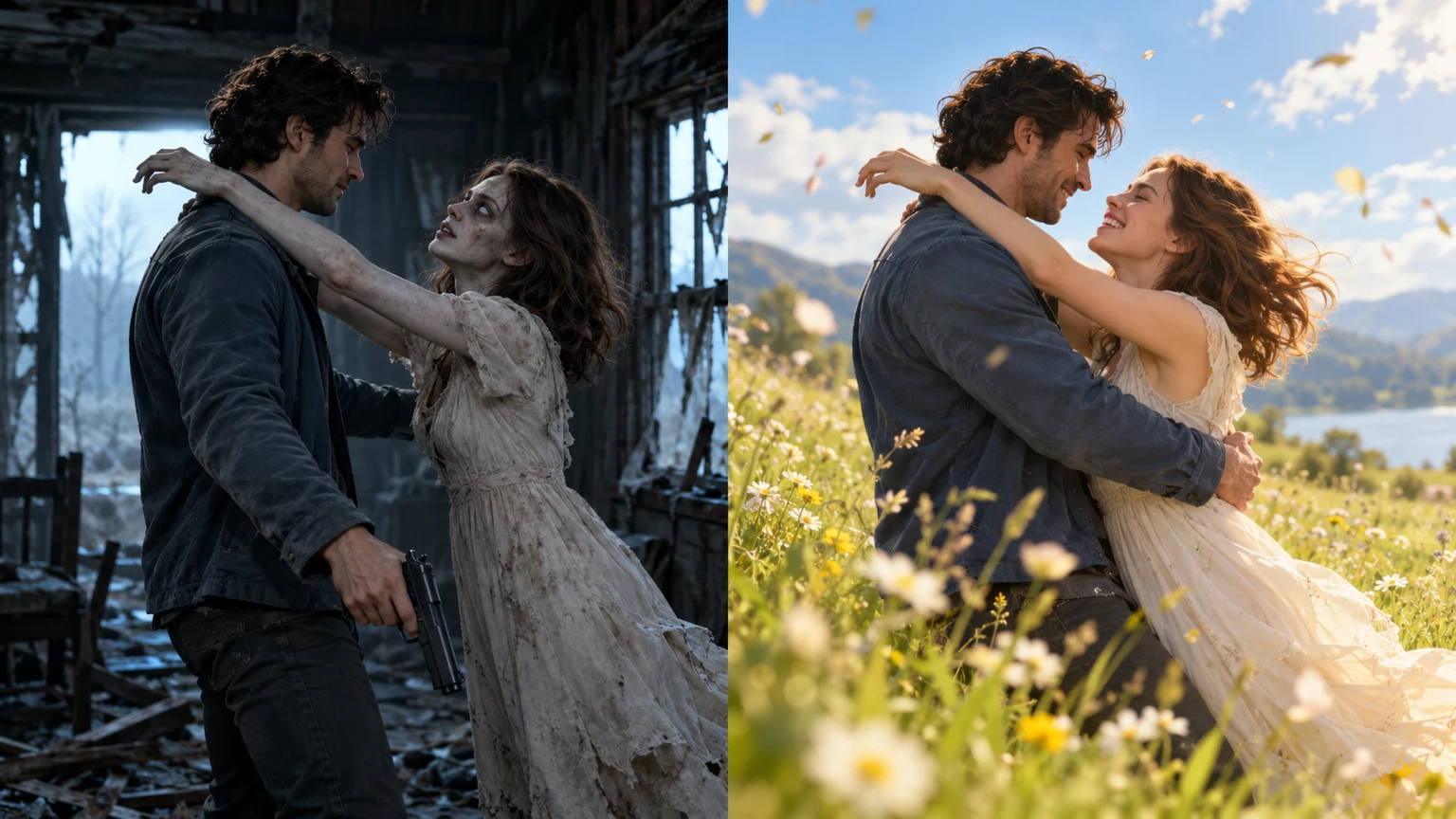
The scene plan starts in an abandoned house, where the human recognizes the infected partner. An open-armed embrace links that encounter to a bright mountain meadow and a memory of the couple together. The generator requests this sequence; the result can vary in appearance, motion and timing.
Before judging a result
Use the existing preview to understand the shift from the dark encounter to the brighter memory. The accompanying illustration is concept art, not proof of a particular generated result. Your photos are new references, so the delivered video will not be an exact copy of the preview.
Before payment
Gather one portrait for each role and decide where you want to share the result. This page keeps the Mountain Reunion story; its framing selector changes the aspect ratio, not the setting.
Place the human partner in photo 1 and the infected partner in photo 2. The second person returns to their healthy appearance in the memory; a normal portrait is enough.
Select vertical 9:16 for a tall composition or horizontal 16:9 for a wider scene. Both request the same 25-second duration and 720p resolution.
Pay US$5.00 once, save the private link and use it to check progress. Preview the delivered video and download a copy within 14 days after delivery.
Photo preparation
Choose portraits with one consenting adult in each image. Look for visible eyes, an unobstructed face and enough detail to distinguish the two people. An everyday photograph is suitable; you do not need matching clothes or zombie makeup. Check each upload preview for the intended person before continuing. A distant subject, a crowded group, sunglasses or a strong filter can make the reference harder to interpret. The two images guide the characters across both scenes, but AI can still alter their appearance. Review faces, hair and body proportions in the finished file rather than assuming a clear photo guarantees the same likeness in every shot.
Think of the video as two moments linked by one action. In the opening, the human faces a loved one who has become a zombie, lowers a weapon and opens their arms. At the embrace, the story returns to a happier mountain-meadow memory. The second scene should read as a remembered relationship, with the infected character healthy again. That scene order comes from the template; the form does not ask you to assemble individual shots or set the exact frame of the cut.
The order requests 25 seconds at 720p. The scene instructions plan around 10 seconds for the encounter and 15 for the memory, but those timings are not guaranteed. Your 9:16 or 16:9 choice applies to the full clip. If you want the farmhouse and wheat-field setting instead, return to the homepage and choose Wheat Field Memories before placing an order. The dog reunion also has its own generator and expects a dog photo in the second slot.
The uploader accepts JPG, PNG or WebP files up to 10 MB each. Before paying, inspect the two previews, confirm the human and infected roles, and check your aspect ratio. Enter an email that support can use to contact you, then keep the private order link provided by the workflow. The email is not a substitute for that link: there is no video delivery by email or automatic email-based recovery of a lost order.
Open the same private order page to follow processing. Once the file is ready, watch the full clip, then examine the transition more closely. Compare the faces, arm positions and direction of movement; also check that the memory shows the healthy partner. Listen for unexpected sound changes before adding music. Download your file within the 14-day retention window after delivery. A result can differ from the intended storyboard even when the uploads were clear and the selected settings were correct.
The embrace is the visual link that makes the scene change readable. If you edit the download, watch the cut without captions first: the viewer should be able to follow the relationship through the movement. The generation prompt requests natural scene audio without background music, but sound can vary. A separate editor can add a caption or licensed soundtrack after you review the file. Neither music selection nor caption writing is a control in this generator.
Order and output details
This is the couple version of Mountain Reunion. Two adult portraits guide the characters in an abandoned-house encounter and a mountain-meadow memory. The homepage provides the choice between the two couple templates.
The embrace is meant to continue across the scene change, connecting the zombie encounter to a healthy, happy memory. AI may change body positions or the moment of the cut, so inspect that part of the result.
The request is one 25-second video at 720p. You choose 9:16 or 16:9 in the form. The planned split between scenes guides generation but does not promise an exact cut at ten seconds.
US$5.00 is a one-time purchase for one video, with no subscription or automatic renewal. Read the pricing and refund policies for the terms that apply to an order.
Yes. The first portrait supplies the human partner and the second supplies the infected partner. Swapping the photos swaps those roles; check the labels before continuing.
Open the homepage and select the Wheat Field Memories card before using its generator. This page uses Mountain Reunion. For a person-and-dog story, use the dedicated dog reunion page.
The instructions request a non-graphic infected appearance with no blood, bite or injury. Review the delivered video before sharing, since AI can depart from the requested details.
The portraits and storyboard guide the result, but exact likeness, anatomy, sound and timing are not guaranteed. Use the preview to understand the concept rather than to predict every frame.
Follow the private order page for processing, preview and download. Keep the access link and save the file within 14 days after delivery. Processing time depends on provider capacity and its queue.
AI zombie love story reels editing guide and generator
Yes. After downloading, you can trim the clip or add captions and music in your own editing app. The linked Reels guide explains the finishing workflow; posting to a social platform is a separate step.
Copy the full prompt and read the editing process
The tutorial includes the free English story prompt and links to its portrait and landscape versions. Read it to understand the reference-photo roles and the intended embrace-to-memory action.
Check the two portraits, select your frame and keep the private link after the one-time purchase.
Buy and generate · $5.00