01 · A couple in the mountains
Mountain Reunion follows a couple from an abandoned house into a sunny mountain meadow. The embrace connects the two moments, with the infected partner appearing healthy in the memory.
Turn two photos into a 25-second zombie reunion video. Choose a couple story here, or open the dog reunion generator for a story with your pet.
Mountain Reunion or Wheat Field Memories · 720p · US$5.00 once · no subscription
Get the Zombie Apocalypse AI Video Editing Prompt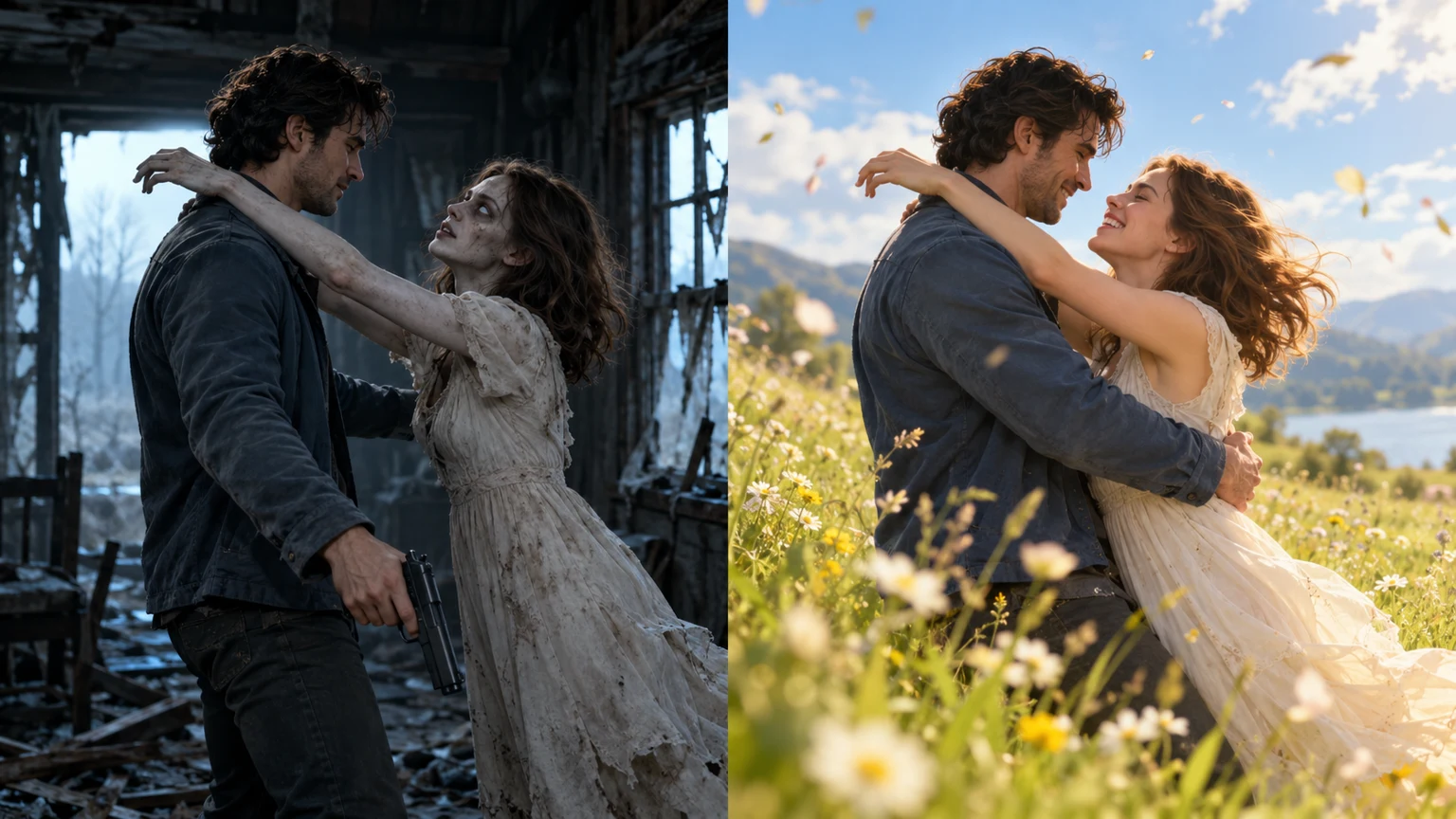
The story begins with an unsettling encounter and ends in a happier memory. Decide who appears in it and where that memory belongs before uploading.
Mountain Reunion follows a couple from an abandoned house into a sunny mountain meadow. The embrace connects the two moments, with the infected partner appearing healthy in the memory.
Wheat Field Memories gives the couple a different setting: a farmhouse encounter and a bright wheat-field memory. Select its card above before using the form.
For a human-and-dog story, use the separate dog reunion generator. It needs one adult portrait and one clear dog photo, and follows the mountain reunion setting.
The form uses two reference images, a story template and your choice of aspect ratio. Review those choices before continuing to the one-time payment.
For a couple, the first photo is the human and the second is the infected partner. For the dog story, the second photo is your dog. Use images you have permission to upload.
Choose vertical 9:16 or horizontal 16:9. Both request a 25-second video in 720p; the aspect ratio changes the frame, not the purchase price.
Pay US$5.00 for one video and keep the private order link. Check progress there, then preview and download the delivered file within its 14-day retention window.
You can start an order in the form above or read the free instructions first. The couple generator page explains the Mountain Reunion workflow in detail; the prompt pages describe the story and reference images for people who want to use another tool. After delivery, a separate video editor can add captions or music for your chosen platform. The paid generator itself does not offer a song or caption selector.
Review the scene order and a practical checklist for captions, sound and the transition.
Read the complete story instructions before deciding whether to use a separate video tool.
See the photo roles, framing options and delivery steps for Mountain Reunion.
Read how the frightening encounter changes meaning when the story returns to a memory.
The two couple templates share a reunion structure but use different surroundings. Mountain Reunion moves from a damaged house to an open mountain meadow. Wheat Field Memories moves from a farmhouse scene to a wheat field. Their cards above show the available references and let you select the story submitted with your order. The wheat-field reference is about 30 seconds long; that preview length does not change the 25-second video requested by a purchase.
Both templates ask for an opening encounter followed by a brighter memory, with a planned change of scene around the embrace. The storyboard allocates roughly 10 seconds to the opening and 15 seconds to the memory. These are generation instructions, not frame-by-frame controls. Compare the settings to choose the mood you want, while allowing for differences in poses, faces and timing in your own result. The dog generator uses its own human-and-dog story and does not offer the wheat-field template.
Use one clear adult portrait in each couple slot. A visible face, even lighting and a simple crop give the model a more useful reference than a distant face or a group picture. Check that hair, eyes and the outline of the face remain visible in the preview. JPG, PNG and WebP are supported, with a maximum of 10 MB per image. You can replace a file before checkout if you selected the wrong picture.
The upload labels determine the roles. In a couple video, photo 1 stays human and photo 2 represents the infected partner, who appears healthy in the memory. You do not need to supply zombie makeup. In the dog workflow, the second reference should show one dog with a clear muzzle, ears and coat markings. Avoid covered faces, strong filters and crowded backgrounds. Better inputs help the model interpret the request, but they cannot guarantee a faithful likeness throughout the clip.
Pick 9:16 when you want a tall frame for Reels, TikTok or Shorts. Choose 16:9 when you want a wider landscape composition. Make this choice in the form before paying: the requested video has that aspect ratio, a 25-second duration and 720p resolution. Consider where the people or dog will sit within the frame, particularly if you plan to place text over the video in another editor later.
The story instructions request natural scene sounds without background music. Listen to the actual file before adding a soundtrack, because generated audio can differ from that direction. If you add captions, keep them away from the faces and the embrace so the change of scene stays readable. Music and captions are finishing choices you make after downloading; they are not included as configurable options in this form.
After selecting your references, story and framing, enter a contact email and continue to checkout. One video costs US$5.00 with no subscription or account requirement. The private order page is where you follow processing and access the result. Keep its link: the contact email is not a video delivery service or an automatic way to recover a lost order. While an order is processing, return to that page to check it instead of submitting the same purchase again.
When the video is ready, preview it and download a local copy within 14 days after delivery. The private link grants access to the order, so treat it as private. Before sharing the file, check the faces in both scenes, the position of hands or paws, and the movement through the transition. Save any editing work locally too. The site retention window is a time to collect your delivery, not permanent storage for your video collection.
A match cut connects two shots through a recognizable movement or pose. Here, the approach in the dark scene becomes a reunion in daylight. Pause just before and after the embrace to compare the direction of movement and the placement of the characters. That comparison is more useful than expecting every frame to copy a preview. If the body positions change sharply, the story may feel less continuous even when each scene looks convincing on its own.
An explanation of the editing technique that connects actions across different scenes.
Yes. Download the delivered video and use your own editor to trim it or add captions and licensed music. Choosing 9:16 before generation prepares a vertical frame; posting and editing take place outside this site.
The full English prompt is free to read and copy from the linked tutorial. A separate tool may have different upload limits, output options and prices, so its result can differ from the built-in generator.
Zombie AI Trend Art uses two photo references to request an AI reunion story. A couple or a person and dog appear in an apocalypse scene, then in a happier memory. Choose the relevant generator before uploading.
The embrace gives both scenes a shared action. Its movement is meant to carry the viewer from a frightening present into a warm memory, making the relationship understandable without an explanatory caption.
Each purchase requests one 25-second video at 720p, in 9:16 or 16:9. The longer wheat-field reference is a preview, not the purchased duration. Individual scene timing can vary.
No. US$5.00 pays for one video. There is no subscription or automatic renewal. Review the pricing and refund pages for the purchase terms before paying.
For a couple, photo 1 is the human and photo 2 is the infected partner. The dog generator instead uses an adult portrait followed by a dog photo. Verify the labels and previews before checkout.
The homepage offers Mountain Reunion and Wheat Field Memories for couples. The dedicated couple page uses Mountain Reunion, and the separate dog generator uses its human-and-dog mountain story. Snow is not a built-in option.
The story instructions call for a non-graphic appearance without blood, bites or injuries. Review the generated video before sharing because an AI result can differ from its instructions.
No exact match is promised. AI can change faces, hands, movement, sound and the timing of the cut. The previews explain the intended story; your uploaded photos guide a new result.
Use the private order page saved from checkout. Processing depends on the generation provider and its queue. Check that order for status rather than relying on a fixed completion estimate.
The editing prompt guide explains the reference-photo instructions and the embrace-to-memory transition. It is useful if you want to understand the scene plan or adapt a prompt in another tool.
Your purchase requests a 25-second, 720p video in the selected format. Download the result from your private order page after processing.
One-time US$5.00 payment. No subscription. Keep your private link and download within 14 days after delivery. AI likeness and exact shot timing are not guaranteed.
Use these pages for a specific decision: choosing references, understanding the story, preparing an edit or checking the purchase terms. The guides are available to read before placing an order, so you can work out which workflow suits your images.
Read how photo references and scene instructions work together.
Prepare two portraits for the default Mountain Reunion couple story.
Plan a finishing pass for the video you download.
Check the continuity of body position and movement.
Open the dedicated form for an adult portrait and a dog photo.
Understand the reunion narrative before making your own.
Read and copy the complete English scene instructions.
Follow the story from recognition to the happier memory.
Learn what the prompt asks for at the transition.
Compare photo qualities that make the references easier to interpret.
Check what the one-time payment covers.
Find the next guide for your particular editing question.
The policy pages explain how uploads and order information are handled, which uses are allowed, and how payment and refund requests work. If you need help with an existing purchase, include its order ID when contacting support. Do not send the private access token or full payment-card details.
Compare the couple templates above, check your photo roles, and create when you are ready.
Choose a workflow, compare templates, and prepare your video for sharing.
2026 guide: A practical upload-to-download walkthrough for a 25-second zombie love story, including role selection, private order links and a final video review.
2026 guide: Compare the free zombie story instructions with hosted video generation, including external tool costs, creative control and what the $5.00 purchase includes.
2026 guide: Compare the two couple templates by setting, action and preview, with clear limits on duration, identity and what selecting a template changes.
2026 guide: Prepare an owner portrait and dog photo, use the dedicated dog story, and review coat markings, anatomy and the reunion before sharing.
2026 guide: Choose a useful frame before generation and follow a practical review for face drift, awkward match cuts, sound and private download problems.
2026 guide: Make a zombie girlfriend AI video from two photos with a built-in story of a lowered gun, an embrace and a warm memory. See roles, cost and limits.